Preview Your
Statistics Instantly
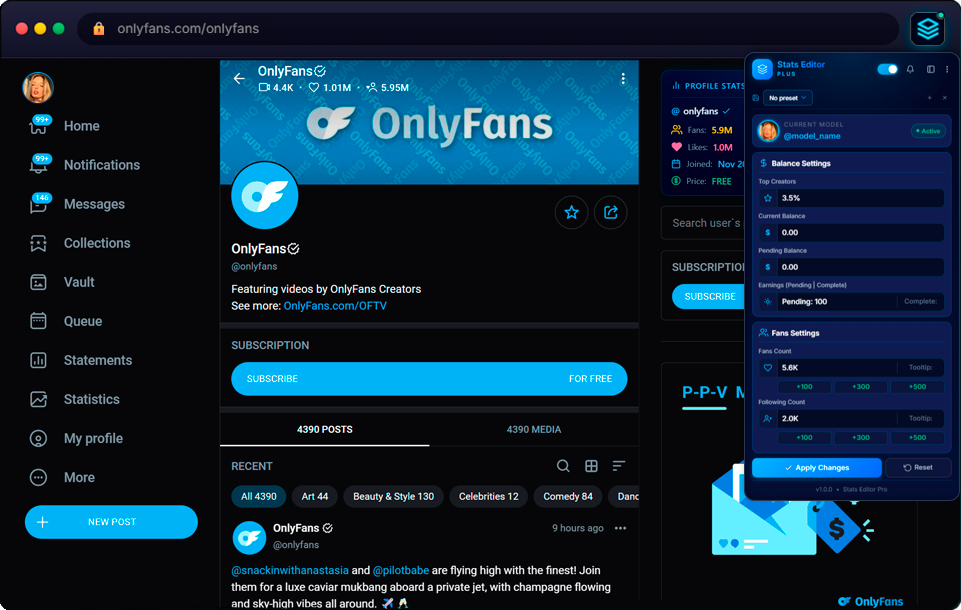
Visual editor for OnlyFans statistics.
Create stunning mockups for screenshots & presentations.
Take Control
Over Your Stats
Professional tools for creators who think bigger. Manage all aspects of your statistics display with a single click.
Everything You Need
Powerful tools to visually preview and customize your statistics display
Balance Preview
Visually preview your current balance, pending balance, and earnings display with custom values.
Fans Count Editor
Customize fans count appearance with quick increment buttons (+100, +300, +500) for instant preview.
Profile Stats Badge
Display detailed profile statistics with a floating badge. See fans, likes, join date and price at a glance.
Chart Preview
Set any amount and the plugin automatically rebuilds the chart to match your criteria. Save presets for later use.
Top Creator Badge
Set custom top creator percentage to see how it would look on your profile page.
100% Safe & Visual
All changes are purely visual and temporary. Nothing is saved or sent — resets when the extension is disabled.
Profile Stats Badge
Display detailed profile statistics with a beautiful floating badge. When fans are hidden by the model, stats are pulled from our database so you always see the real count.
Fan Database Tracking
Automatically save and track fan counts for every model you visit
Auto-Save
Fan count is saved automatically when you visit any model's profile page.
Persistent Storage
All data is stored in cloud database and synced across devices.
Always Visible
Fan counts are always displayed on profile pages, even after page refresh.
Earnings Chart Before & After
Set any amount and the plugin auto-rebuilds the entire chart to match
Save Presets
Save your chart settings as presets and load them instantly. Create multiple scenarios for different purposes.
Auto Chart Rebuild
Enter any target amount and the plugin automatically generates a realistic chart that matches your criteria.
Any Amount
Set absolutely any earnings amount — from $100 to $100,000+. The chart adapts to display it naturally.
Custom Gross All Time
Set any Gross amount and the plugin recalculates everything automatically
One Number — Full Control
The All Time Earnings chart on OnlyFans shows your total income since day one. With the Gross Editor, you simply enter your desired Gross amount and the plugin handles the rest — calculating the Net value (after platform fees) and distributing earnings naturally across all months to create a realistic-looking history.
Auto Net Calculation
Enter Gross — Net is calculated automatically based on the OnlyFans commission rate (20%).
Monthly Distribution
The total amount is distributed across all months of your account history with natural variation — no two months are the same.
All Time Chart
The All Time earnings chart rebuilds completely — each month shows a realistic bar that matches the total you set.
Get Started in 3 Steps
Install Extension
Add Stats Editor to Chrome from the Web Store. It's free and takes seconds.
Open Statistics Page
Navigate to your OnlyFans statistics or profile page as usual.
Preview & Screenshot
Click the extension icon, set your values, and take screenshots instantly.
Frequently Asked Questions
Everything you need to know about Stats Editor
Ready to Preview Your Stats?
Install Stats Editor and create stunning mockups in seconds.
Install Free — Chrome Web Store